$16.18
$25.89
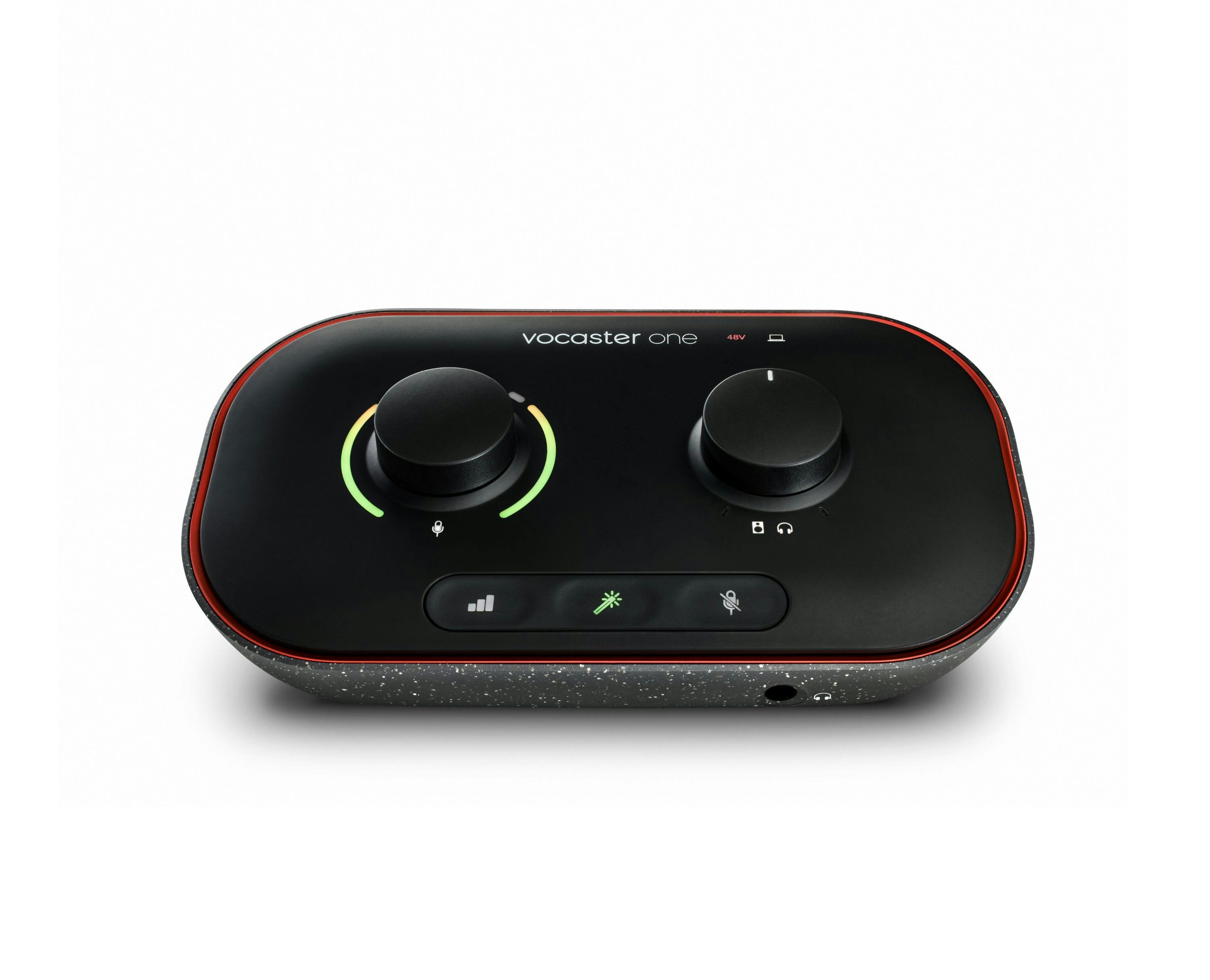
Description How do you get the studio sound your podcast deserves? The answer has never been clearer. Get incredible sound, with enough gain for any XLR mic. Set levels, enhance your sound with one click, and stand out with Vocaster One in seconds. Create great sounding podcasts more easily than ever with Auto Gain, Enhance, the Easy Start tool and award-winning support to get you recording straight away. Key Features Broadcast quality sound — Get studio sound in seconds from Vocaster’s high quality mic input Over 70dB of gain — Get the best out of any mic, no booster needed. Auto Gain — Set your level in seconds, just push the button, start talking, and let Auto Gain do the rest. Enhance — Select one of three podcaster-approved presets and reveal the true quality of your voice. Mute — Just hit the button and cut out coughs, sneezes and any other unwanted interruptions. Phone Connectivity — Connect your phone with a single TRRS cable and capture the whole conversation, or play music and other high quality audio from your device straight onto your show. Camera Connectivity — Send Vocaster’s high quality audio straight to your camera with a single TRS cable and level-up your vlog. Stereo Loopback — Grab audio from your computer and stream straight onto your show. Great for intros, outros, music and more. Easy Start — It’s never been easier to get recording. Focusrite’s tried-and-tested Easy Start tool will have you on air in minutes. All the tools you need — Includes Hindenburg PRO for six months, and six months of Acast Influencer. Vocaster Hub — Set your levels, enhance your sound, route audio from your phone and computer, and hear your Show Mix. 70 db gain range One mic in and headphone out Auto Gain Mute button Four voice presets Easy Start Studio sound in seconds Auto Gain sets your levels with the click of a button, with more than enough gain on tap for the most popular broadcast mics — no booster needed. Find your voice The Enhance button reveals the true quality of your voice. Four podcaster-approved presets bring out the best in any voice in one click, and you can customise your own with Vocaster Hub. Cut it out! Don’t let coughs and sneezes — or any other unexpected interruptions — mess up your podcast. Hit the mute button and silence the mic until you’re ready to go again. Sound as good as your video looks You’re one cable away from adding Vocaster’s studio sound to your vlog. No need to sync up in post, just plug in and hit the red button. Add a professional touch Stream pre-recorded segments such as intros, outros, calls or any other audio you can think of from your computer with two sets of stereo loopback. Keep the story going and sound just like you’re in a broadcast studio. It’s your call Bring in guests over the phone with one cable and capture the whole conversation, or record high-quality music or other audio from your device, seamlessly. Everything you need With Hindenburg PRO for six months, and six months of Acast Influencer to publish, you’re ready to get your show out there. Better for everyone With Vocaster, we’ve taken big steps forward in reducing the impact our interfaces have on the planet. We have carefully chosen components, biodegradable and recyclable packaging, and used more than half the plastics from recycled sources. Vocaster Hub works with screen readers allowing control of Vocaster’s key features, so there are more ways to get on air than ever before. Simple setup for podcasting and conference calls Connect Vocaster to your computer through USB-C to record into the podcast recording software of your choice, and access Vocaster Hub to customise your sound. Impress your colleagues with broadcast-quality audio by selecting Vocaster as your audio input on Zoom, Skype, and Teams. Use the Host XLR input for your microphone and connect your headphones to the Host output at the front of the interface to avoid feedback or echo. Complete setup for podcasts and streaming Expanding on the simple setup, you can use the two loopback channels via your computer to bring in additional audio and connect your monitors, DSLR camera, and mobile phone — perfect for video podcasts and livestreaming. Mix and edit your show through your monitors, record broadcast-quality audio straight to your video or live stream, and call in guests or bring in other sound sources through your devices to your podcast. 1. Mic input Connect any microphone via an XLR cable (included with Vocaster One Studio). 70dB gain range and phantom power control. 2. Headphone output Connect your headphones to hear your show mix as the world will. 3. Speaker outs Connect to your speakers in mono or stereo to Vocaster when you’re editing your podcast. 4. Phone input Allows you to bring audio in from your phone, including called-in guests. (TRRS to TRRS cable required, not included.) 5. Camera output Record your professional podcast audio straight into your camera to make life easy. (TRS to TRS cable required, not included.) 6. Auto Gain Hold down Auto Gain button to have Vocaster listen in and set the correct audio level, so you’re ready to record. 7. Enhance Bring out the best of your voice in one click with a choice of four voice presets, switchable within Vocaster Hub. 8. Mute Quickly mute audio to avoid interruptions. 9. Mic gain The coloured gain ring gives you instant visual feedback when your voice level is perfect. 10. Volume control Keep your volume in check. Specifications What’s in the box Vocaster One audio interface USB-C to USB-A cable Inputs Mic input gain range: 70dB Mic input frequency range: 20Hz – 20kHz Outputs Headphone output frequency range: 20Hz – 20kHz Speaker output frequency range: 20Hz – 20kHz Connectivity Phone input and output: Mono. Requires 3.5mm TRRS cable, not included Camera output: Requires 3.5mm TRS cable, not included *Requires 900mA USB port Compatibility Windows: Intel, AMD, and Arm64 processors supported macOS: Apple Silicon and Intel processors supported
Studio Audio Interfaces